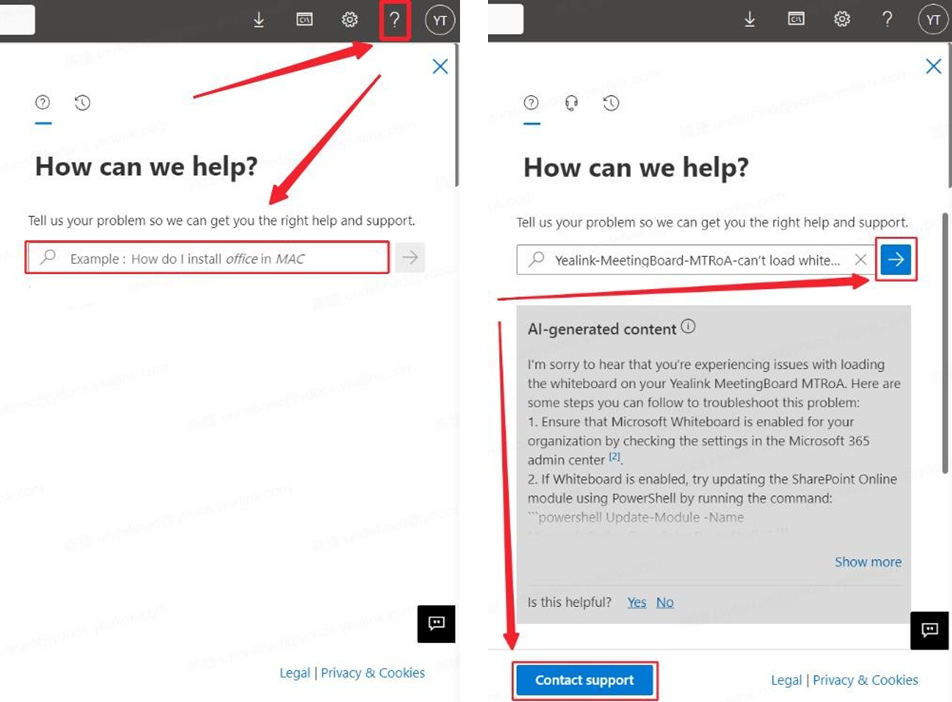
If the issue cannot be resolved after initial diagnosis and is determined to be a Microsoft-related problem, it is necessary to directly contact Microsoft Support to resolve the issue.
1.Go to the Microsoft 365 admin center. At the bottom-right side of the page, select Help & support. Or, go to the Microsoft Teams admin center. At the bottom-right side of the page, select Need help.
2.In the Tell us your problem text box, enter Teams Rooms Portal, and then press Enter.
3.Review the suggested topics. If the results aren't helpful, select Contact support.
4.In the Contact support pane, specify the following information:
1. Title
2. Description
3. Contact info: number, email address, and preferred contact method.
4. Attachments: collected logs, screenshots, and videos.
5. Select Contact me.