
Typically, On Exchange Online Resource mailboxes do not share all calendar details by default. Users who don't have permission on the room mailbox calendar will only see if the room is busy or not. However, the delegates can see all details by default. Also, a Resource mailbox is configured to AutoAccept in a Microsoft Exchange online environment. You can send a meeting request to the Resource mailbox, the meeting request is accepted automatically, and the meeting subject is displayed correctly in the organizer's mailbox and users can see that the meeting subject is replaced with the organizer's name by default.
To check this default behaviour for resource mailbox calendar processing in Exchange online environment, you can run the following PowerShell Command.
- Connect to Exchange Online (open PowerShell as administrator from your device)
Connect to Exchange Online PowerShell | Microsoft Learn
- Run the following command
Get-CalendarProcessing -Identity (enter your resource mailbox) | FL
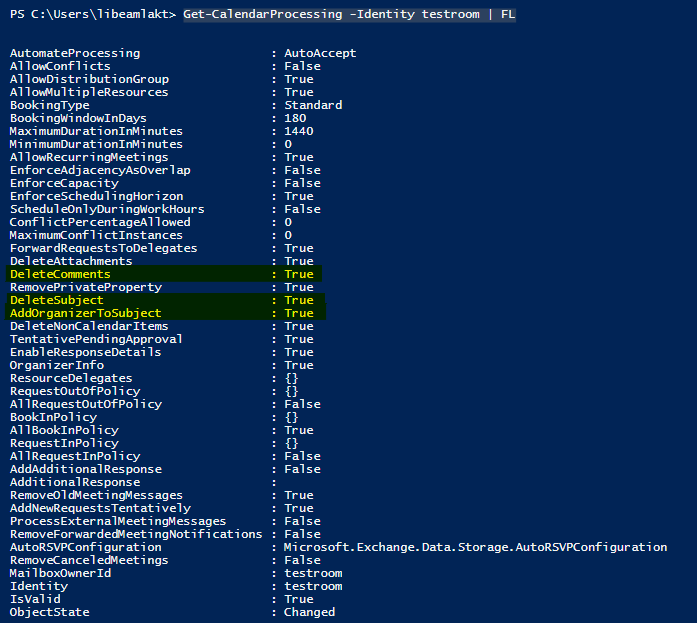
Therefore, AddOrganizerToSubject parameter specifies whether the meeting organizer's name is used as the subject of the meeting request.
so, set this parameter $true: means the meeting organizer's name replaces any existing Subject value for the meeting request. This is the default value.
Also, DeleteSubject parameter specifies whether to remove or keep the subject of incoming meeting requests. So, when we set value $true: means remove the Subject value of incoming meeting requests. This is the default value.
You can refer to Set-CalendarProcessing (ExchangePowerShell) | Microsoft Learn