Symptom
The error message "You must insert HDMI adapter that came with this device" appears when using the MTouch II device.
Cause
- Incorrect cable connection or port usage.
- Missing or corrupted MTouch II auxiliary stream driver.
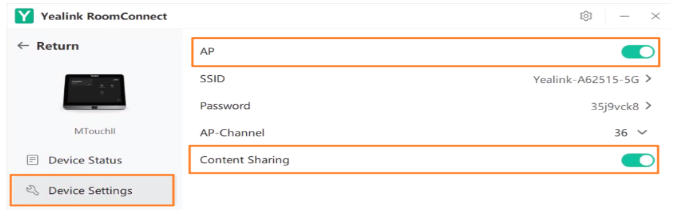
- Auxiliary stream function was disabled.
- Use of non-original HDMI adapter.
Resolution
- Verify the device connection. Follow the official deployment diagram to confirm that all cables are connected to the correct ports on the MTouch II and related devices. Refer to Connect MVC860-C5-000
- Use the original Yealink HDMI adapter. Third-party adapters may not be recognized and can trigger this error.
- Reinstall the auxiliary stream driver. Refer to Reinstall Drivers for MVC Devices
- Enable the auxiliary stream function. Go to Yealink Room Connect, make sure that the Content Sharing function is enabled on the MTouch II.